The Autel MaxiScope MP608 is a 4-channel automotive oscilloscope designed to connect with compatible Autel MaxiSys tablets or Windows PCs through a USB cable. It is used for vehicle electrical signal testing and waveform analysis, featuring 12-bit vertical resolution, 20MHz bandwidth, up to 80MS/s single-channel sampling rate, and ±1% accuracy.
Main Functions
Four-Channel Oscilloscope Testing
The Autel MP608 provides four input channels:
- Input Channel A
- Input Channel B
- Input Channel C
- Input Channel D
It supports multi-channel signal testing through connected test leads or probe terminals.
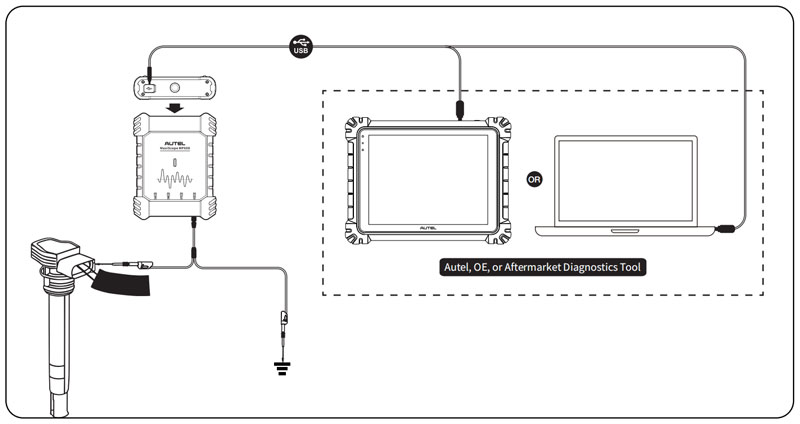
USB Connection
The MP608 connects with:
- Autel next-generation MaxiSys tablets
- Windows PCs running Autel MaxiScope software
After connection, users can open the MaxiScope application and select the required oscilloscope testing function.
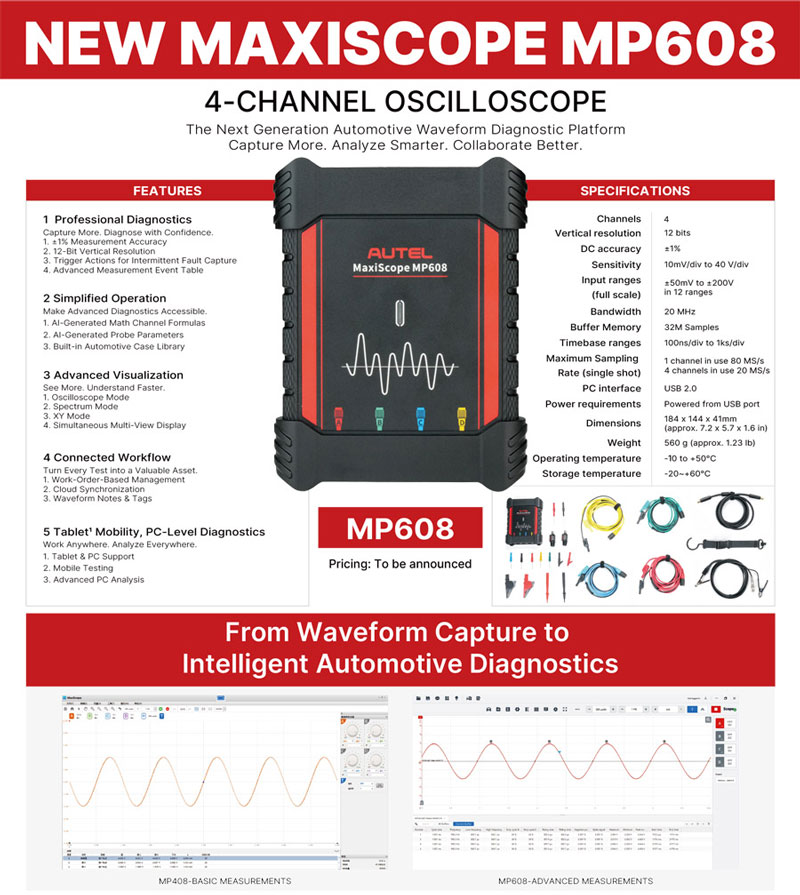
Technical Specifications
| Item | Description |
|---|---|
| Channels | 4 |
| Vertical Resolution | 12bit |
| Bandwidth | 20MHz |
| Sampling Rate | • 80MS/s Single Channel • 20MS/s Combined Channel |
| Accuracy | ±1% |
| Sensitivity | 10mV/div to 40V/div |
| Input Ranges (full scale) | -50mV to +200V |
| Storage Temperature Range | -20 to +60°C |
| Dimensions (protection rubber case included) | 184 × 144 × 41mm |
PC Software System Requirements
The Autel MaxiScope software requires a compatible Windows PC. A more powerful computer can improve software performance.
| Item | Minimum Specification | Recommended Specification |
|---|---|---|
| Operating System | Windows 10 (64-bit) Build 1809 and above or Windows 11 | (64-bit) |
| Processor | Intel Core i3 2nd Generation (Sandy Bridge) / AMD A Series Dual-Core 1.6 GHz | Intel Core i5 8th Generation / AMD Ryzen 5 Quad-Core 2.5 GHz and above |
| Memory | 2 GB RAM | 8 GB RAM and above |
| Graphics Card | Integrated or discrete graphics card that meets Windows 10/11 system requirements | Integrated graphics card (Intel UHD 620 / Iris Xe, etc.) or entry-level discrete graphics card |
| GPU Driver | Manufacturer-signed driver (not the default Windows WDDM display driver) | Latest driver from graphics card manufacturer’s official website |
| Display Resolution | 1280×720 | 1920×1080 and above |
| Free Disk Space | 2 GB | 4 GB and above |
| Ports | USB 2.0 Port | USB 3.0/3.1/3.2 Port (Highly recommended for high-speed data acquisition) |
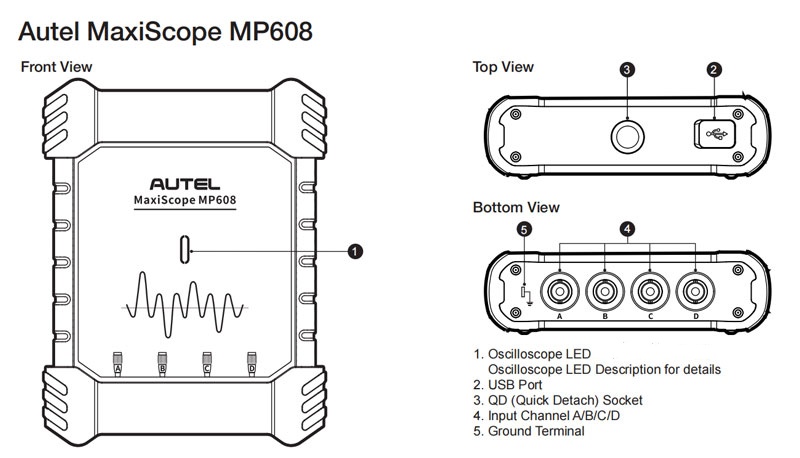
Indicators / Buttons / Hardware Description
Hardware Layout
| Component | Description |
|---|---|
| Oscilloscope LED | Status indicator. Refer to LED description table below. |
| USB Port | Used to connect MP608 with an Autel tablet or Windows PC. |
| QD (Quick Detach) Socket | Quick connection socket. |
| Input Channel A/B/C/D | Four oscilloscope input channels. |
| Ground Terminal | Ground connection terminal. |
Oscilloscope LED Description
| LED Color | Description |
|---|---|
| Red | • Illuminates solid red automatically at power-up during self-test. • Illuminates solid red if a firmware failure occurs during upgrade. |
| Green | • Flashes green when upgrading or communicating. • Illuminates solid red first, then solid green when connected to an Autel tablet or Windows PC via USB cable. |
App Download & Connection
MaxiScope Software Installation
- Download the Autel MaxiScope software from: www.autel.com > Support > Downloads > Diagnostic Tool > Autel MaxiScope
- Unzip the downloaded file and run setup.exe.
- Click Next, select the installation folder if required, and click Install.
- Click Finish after installation is completed.
MP608 Connection
- Connect the Autel MaxiScope MP608 to an Autel next-generation MaxiSys tablet or Windows PC using the USB 2.0 Cable V2.
- Insert the applicable test lead or probe terminal ends into the input channel(s).
- Open the MaxiScope application.
- Select the required testing option.
Compatible Autel MaxiSys Tablets
The Autel MaxiScope MP608 supports the following Autel next-generation MaxiSys tablets:
- MaxiSys MS909S2
- MaxiSys MS909
- MaxiSys MS909EV
- MaxiSys MS909CV
- MaxiSys Ultra ADAS
- MaxiSys MS908S3
- MaxiSys MS906 MAX
- MaxiSys MS908S II
- MaxiSys MS908S Pro II
- MaxiSys MS906 Pro
- MaxiSys MS906 Pro-TS
- MaxiSys MS906 Pro2-TS
- MaxiCOM MK908 Pro2
- MaxiIM IM608 Pro2
Additional MaxiSys tablets may be supported through future software updates.
Android App System Requirements
The Autel MaxiScope App works only with an Autel Android tablet.
It is not supported on other Android tablets.
Read also
How to Use Autel MaxiScope MP608: Setup, Connection & Update Guide
How to Use Autel MaxiScope MP608: Setup, Connection & Update Guide
Contact Info:
Email: sales@AutelShop.de
Wechat: +86-13429866263
Whatsapp: +86-13429866263
www.autelshop.de