When adding a smart key on a 2024 Nissan Rogue, the key point is BCM access. Using the Nissan 40-PIN Adapter with the Autel MaxiIM IM508S, the key learning procedure can be completed through the OBD.
Tools & Hardware
- Autel IM508S/ IM608 II
- Nissan 40-Pin Gateway
- 2024 Nissan Rogue Smart Key
- Non-marring trim removal tools
Access the BCM and Connect the Adapter
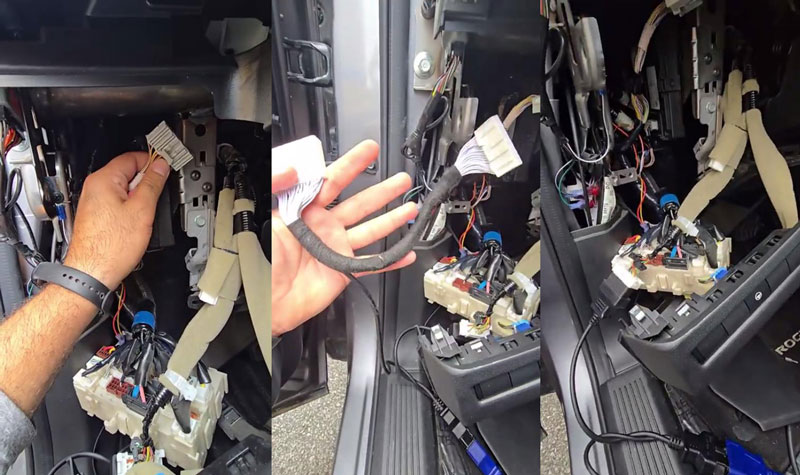
- Remove the lower dash trim under the steering wheel.
Remove the upper trim panel first. It is secured with one screw and clips. Then release the lower panel clips to access the BCM area. - Disconnect the factory gateway/BCM connector.
Press the locking tab and unplug the connector. Install the Nissan 40-pin BCM adapter harness between the vehicle connector and the BCM. - Connect the adapter to the vehicle.
Plug one OBD connector into the vehicle OBD port and connect the other OBD connector to the Autel programmer.
Enter Key Learning & Read Key IDs
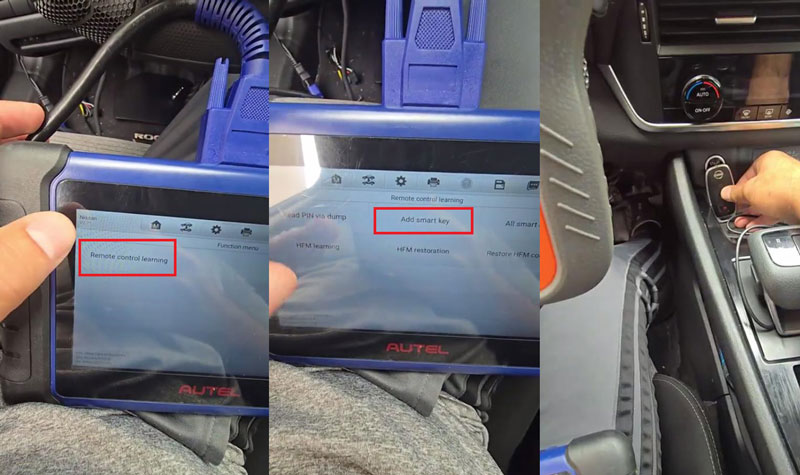
On the Autel tablet, enter:
Control Unit → Control Unit System → OK → Remote Control Learning → Add Smart Key → Start → Yes
- Follow the prompts to prepare the vehicle.
Turn the hazard lights on and switch the ignition on. Confirm the VIN, then hold the Start/Stop button to turn the ignition off. Turn the hazard lights on again, put the transmission in P/N, and wait until the EVL is unlocked. Press OK to continue. - Start reading the key IDs.
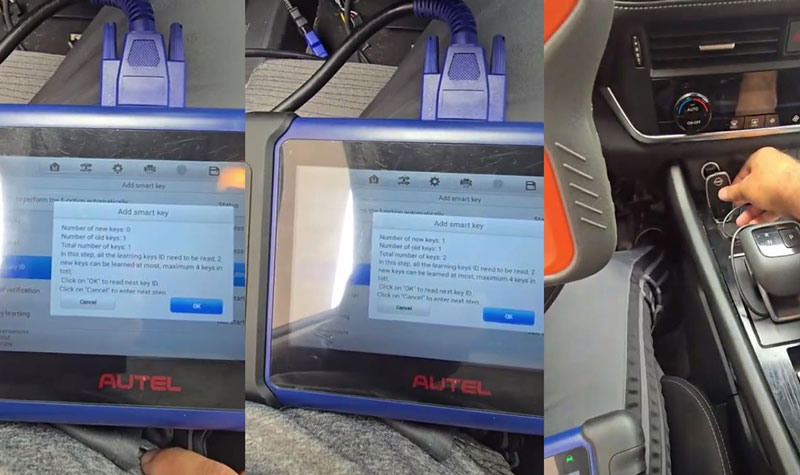
Place the original smart key (tag facing upward) on the ignition switch. Keep the key in contact with the switch and do not press any buttons.
After the original key is detected, press OK and place the new smart key on the ignition switch to read its ID.
Program the New Smart Key
- Select Start to Program Key.
Place the original smart key on the ignition switch and press OK. - When Learning Success appears, continue with the new smart key. Remove the original key, place the new smart key on the ignition switch, and press OK.
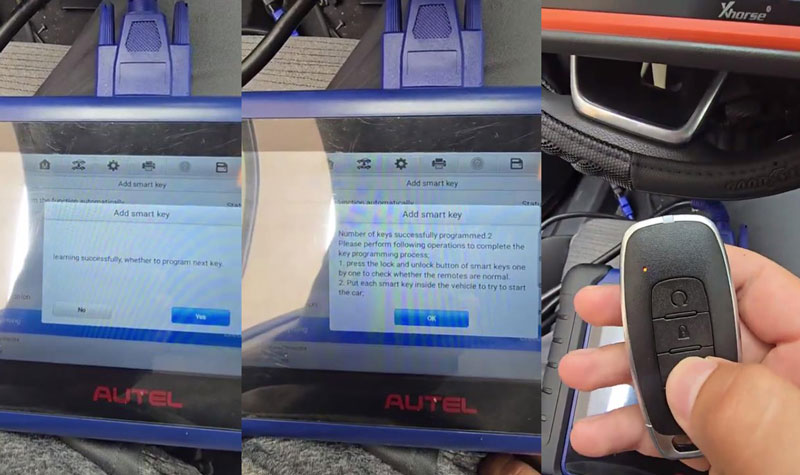
- When the tool confirms that 2 keys have been successfully programmed, continue to the final check.
Verification
Verify that both smart keys can lock and unlock the vehicle, and confirm that the vehicle starts normally with each key.
Workshop Notes
If a check engine light or other warning indicator appears after programming, disconnect the battery for about 2–3 minutes, then power the vehicle back on. After finishing the procedure, disconnect the 40-pin BCM adapter and reinstall the removed trim panels.
Contact Info:
Email: sales@AutelShop.de
Wechat: +86-13429866263
Whatsapp: +86-13429866263
www.autelshop.de