When you first get a MaxiSys it is important to find out your Serial Number and Registration Password.
The Video below shows a step by step guide on how to find this on your tool.
Autel Diagnosis / Key Prograrmming
 Autel
Autel Creating a report on a DS708 is simple when you know how. Please follow the steps below. Choose the Manufacturer and the Vehicle you are plugged in too with our diagnostic tool. Carry out an AutoScan function on the vehicle with your diagnostic tool. Once completed look at blue coloured section on right hand side of diagnostic tool screen and see the ‘Report’ button. Click on the ‘Report’ button and you will be able to see the report generated on the screen for you to view. Now you will have 2 options; ‘Print’ or ‘Save’. As long as you have Wi-Fi connectivity and WiFi printing set-up a PC, you can print directly to your PC. Both your PC and Diagnostic Tool must be on the same computer network. If no Wi-Fi available you can save to the diagnostic tools SD card for later at a later date To view on your diagnostic tool later, go to ‘Data Manager’ and then ‘Playback’. And if you want to print this document then there is a print option in Playback. The Report feature will only display a short overview of modules within the vehicle, and record what and how many faults exist. You may also need to go into each module and do screen shots of codes if required. Who Viewed This Article Also Views: AUTEL Automotive Diagnostic Tools Introduction How to connect Autel MaxiDAS DS708 to OBD II/non-OBD II vehicle Autel Maxidas DS708 activate BMW E65 Dynamic Drive Autel Maxidas DS708 scanner reset Audi A4 EPC light
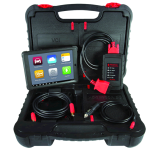
The Video below shows a step by step guide on how to find this on your tool.
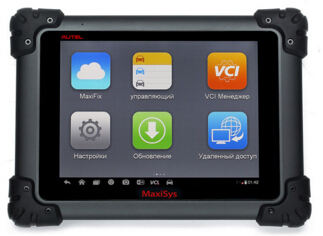
Designed with the DNA of Autel’s diagnostics family, the MaxiSys is built to offer many of the prestigious qualities of the MaxiDAS DS708 with extreme ease of use and powerful diagnostic performance. However the MaxiSys has evolved far beyond the original capabilities. Utilizing an A9 quad-core 1.40GHz processor that offers 50% increase in speed versus competing products, a 9.7” LED screen with a resolution of 1,024 x 768 capacitive touch screen, the revolutionary multitask-capable Android Operating System, combined with the best possible coverage of OE-level diagnostics, the MaxiSys is the perfect diagnostic solution for shops and technicians who demand unrivalled smart technology and smart repairs.
AUTEL Upgrades MaxiCheck to Support 4 New Special Applications
DPF Regeneration–No more DPF guesswork now!
Highlights:
1. Resets the DPF light after the filter has been replaced
2. Performs DPF regeneration
3. Micromanages the injection rate
4. Resets ECU when fitting new DPF
5. Resets EOLYS additive lights
6. Retrieves/ erases DPF-related codes with code definition
TPMS Service – Designed for the Novice, Yet Powered for the Professional
Highlights:
1. Extensive brand coverage
2. Reads / writes sensor ID from vehicle ECU
3. Reads / clears codes of TPMS system and turns off TPMS warning light
4. Reads, records and plays back live data of TPMS sensors (ID, pressure, temperature, battery, etc)
5. Programs vehicle ECU to learn sensor IDs and positions
6. Retrieves TPMS ECU information
ABS/SRS diagnostics – A wonderful utility that can talk to your ABS / SRS system!
Read moreAUTEL Upgrades MaxiCheck to Support 4 New Special Applications
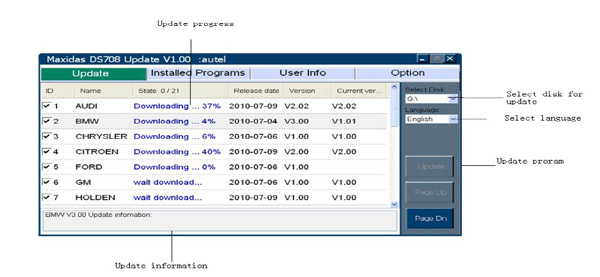
Autel DS708 update main Usage: 1) Upgrade with the programs which ds708 designate to get all the update files. 2) It allows to uninstall the softwares that SD card has already installed before. Operation instructions: Uncompress the package to current folder. PleasePlace the SD card into your computer. Copy and paste the “Scan”and”autorun.exe” files under the root directory of SD card. Run the program “manager-pc” on your PC according to the following promts on your computer. There comes a program called “updateclient” , then run it. You can see this interface as belows. Choose all the package files and click “Update” to download them. (Or choose some according to your personal will.) They can be extracted automatically into your SD card after being downloaded completely. Please no worry and kindly wait for that. “Page up “and “Page down” allow you to view other options or information. If you have more than one DS708 and SD card to upgrade, please “select disk” to choose different SD cards. Uninstall Programs. Under the “Installed Programs”menu, it allows people to delete the vehicles files which SD card installed before. “User Info” has the function to modify the login password. But it is disabled currently until the system is completed. The website information and software version can be checked under the “Option”menu. It also allows people to find a path of the temporary directory to download files. If you want to update autel ds708,you can search UOBDII.COM Who Viewed This Article Also Views How to connect Autel MaxiDAS DS708 to OBD II/non-OBD II vehicle Autel SD Card Error: SD card is damaged, Please insert SD card Diagnostic Scanner Autel MaxiDAS DS708 Review OBD2 Scanner Autoboss V30, Autel MaxiDAS DS708 Comparison
After a year of preparation, blood, sweat and tears, in the blink of an eye – the AVI conference is over. We would like to take this opportunity to first thank all who attended. It was an event for the books and every year it just keeps getting better. We have you to thank for all of that. Now that the fun is over AVI is officialy back to work in the studio. The first order of business on our arrival back was to go through hours of footage from AAPEX/SEMA. So weather you got to go to the show or are a distant admirer you get the chance to re-live the event. TOOL SHOWCASE! Check out these awesome interviews of some of the premier vendors showing off their most innovative tools and products: MotoShop – Technology Tools Supercool – A/C UV Dye Autel – Maxisys System Federal Mogul – Smart Choice Mahle – R1234YF Recovery Unit Delphi – Universal J2534 Launch – Blue Tooth Scan Tool Smoke Wizard – Pop It & Plug It Midtronics – DSS-7000 AC Delco – Chassis Display ATS – Bullseye Leak Detector Big Time – Gorilla Gloves Introduction APAA is American Automobile Parts Association (APAA) Las Vegas International Automotive Aftermarket Products Expo “it was co-sponsored by the American Automobile Parts Association (APAA) ,the American Automobile Repair Services Association (ASIA) and the US auto and equipment manufacturers (MEMA) And its was hold in Las Vegas every years , and have two sub exhibition. AAPEX and SEMA More information : http://showmetools.com/ Who Viewed This Article Also Views: How to do Nissan Xterra Active Test with Autel DS708 Tips on throttle body relearn with autel maxidas ds708 diagnostic scan tool Autel DS708 reset Toyota Camry 07-10 TPMS Autel Maxidas DS708 activate BMW E65 Dynamic Drive
Please see the service reset procedure below; Click on the VAG manufacturer, wither Audi, Seat or other and then, Please select Systems Please select Control unit Please selectelectronics 1 Please select Instruments Please select Adaption The diagnostic tool will now ask you for a channel number. Select channel 002. Ask to set a new value and change to 00000. Once done escape from adaption’s and then go back in again. Select channel 053. Ask to set a new value and change to Once done escape from adaption’s and then go back in again. Select channel 054. Ask to set a new value and change to 00000. Once this is done, escape out of adaptions and instruments, turn ignition off and remove key. Leave for 10 seconds – then turn the ignition back on and service message should have cleared. More information: www.autel.uk Who Viewed This Article Also Views: OBD2 Scanner Autoboss V30, Autel MaxiDAS DS708 Comparison MD802 MaxiDiag Elite vs DS708 MaxiDas AUTEL Automotive Diagnostic Tools Introduction How to connect Autel MaxiDAS DS708 to OBD II/non-OBD II vehicle
Difficulty: Easy
Time: 2 minutes
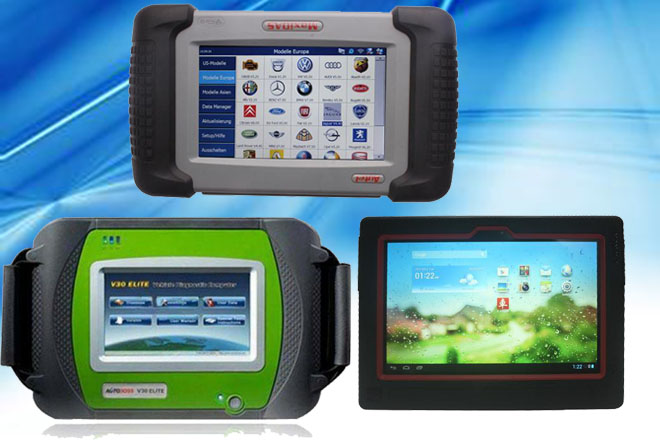
Many of peope may ask us What’s Difference Between Autoboss V30 Elite and Launch and Autel DS708? today we’d like to tell you this answer, let’s see together:
Read moreWhat’s Difference Between Autoboss V30 Elite and Launch and Autel DS708
Autel today announced a new member, MaxiSys, in its
diagnostics family. We will launch this new product on October 1st, 2014 globally.
Designed with the same DNA of our diagnostics family, the MaxiSys is built to offer many of
the prestigious qualities of the MaxiDas DS708 with extreme ease of use and powerful
diagnostic performance. However the MaxiSys has evolved far beyond the original
capabilities.